Nginx FastCGI Cache 缓存清除踩坑实录:花了整个下午排查一个问题:一个 WordPress 站 首页改了一行文字,Chrome 无痕模式打开 , 没变化。
确认了不是浏览器缓存。确认了不是 CDN。确认了 WordPress 确实保存了改动。
最后发现是三件事同时坏掉了,互相掩盖。拆开来讲。
缓存架构回顾
这个 WordPress 站 用的是宝塔面板的标准 Nginx FastCGI Cache 方案(Nginx 官方文档)。四层缓存栈:
Cloudflare → Nginx fastcgi_cache → Redis Object Cache → PHP OPcache
首页的 HTML 由 PHP 生成后存进 Nginx 的 fastcgi_cache,下次访客访问直接返回 HTML,不再走 PHP → MySQL → Redis 整条链路。TTL 1 天,缓存目录结构为 levels=1:2。
就是这个 levels=1:2 埋了第一个雷。
三层失效
改了一行文字 → 保存 → 无痕看不到。拆开看,三层都在静默失败:
第一层:Nginx 没有 purge location
Cache-Control 覆盖也要注意,配完 FastCGI Cache 后单独检查。同时 Nginx Helper 插件在内容更新后会发一个清除请求,告诉 Nginx “这个 URL 的缓存请删掉”。但 Nginx 配置里必须有对应的 location 块来处理这个请求。
宝塔默认配置里没有。Nginx Helper 每次更新文章都在对着空气喊话 , 请求发过去了,Nginx 收到 /purge/some-post/ 这个路径,不认识,交给 WordPress 处理,返回 403。
# 没有 purge location 时
curl -X PURGE https://site.com/some-post/
# → 403 Forbidden
第二层:unlink_files 模式在 levels=1:2 下是坏的
Nginx Helper 有两个清除模式:
unlink_files— 直接删除磁盘上的缓存文件get_request— 发 HTTP GET 请求到 Nginx 的 purge location
我当时用的是 unlink_files。它的逻辑是:拿到 URL → 算 MD5 → 按 levels 拼路径 → 删文件。
问题在于 levels=1:2。Nginx 把缓存文件分散在 0/ 到 f/ 共 16 个二级目录里,每个二级目录下面还有 256 个三级目录。unlink_files 构造的路径跟 Nginx 实际存放的路径对不上。
插件以为自己删了,什么都没发生。
第三层:cache_path 指向了错误的目录
wp-config.php 里:
define('RT_WP_NGINX_HELPER_CACHE_PATH', '/www/server/fastcgi_cache');但 Nginx Helper 自己的选项里存的是:
cache_path: /dev/shm/nginx-cache/dev/shm/ 是个 tmpfs 内存盘。里面确实是空的 , 真正的缓存在 /www/server/fastcgi_cache/ 下面。
就算 unlink_files 路径拼对了,它也在删一个空目录。
三层叠加效果:改了首页 → Nginx Helper 收到钩子 → 用错误的模式在错误的目录删了 0 个文件 → Nginx 继续返回缓存的旧 HTML → 无痕看不到变化。
修复
Step 1:Nginx 加 purge location
每个站的 vhost 配置文件,server {} 块内,include enable-php-*.conf; 之前加:
# FastCGI Cache Purge
location ~ /purge(/.*) {
    allow 127.0.0.1;
    deny all;
    fastcgi_cache_purge WORDPRESS "httpsGET$host$1";
}
httpsGET 是硬编码的。因为缓存 key 是 $scheme$request_method$host$request_uri,所有被缓存的请求都是 HTTPS + GET。如果写成 $scheme,从本地发过来的 purge 请求的 scheme 跟原始请求不一致,key 对不上,删不掉。
$1 是正则捕获组,取 /purge/ 后面的路径部分,把前缀剥掉。
重载 Nginx:
nginx -t && nginx -s reload验证 purge 端点是否响应:
curl -sk -o /dev/null -w "HTTP %{http_code}n"
  -A "Mozilla/5.0" -H "Host: your-domain.com"
  "https://127.0.0.1/purge/"

# 预期:HTTP 200
Step 2:Nginx Helper 切到 get_request 模式
WordPress 后台 → 设置 → Nginx Helper,按以下配置:
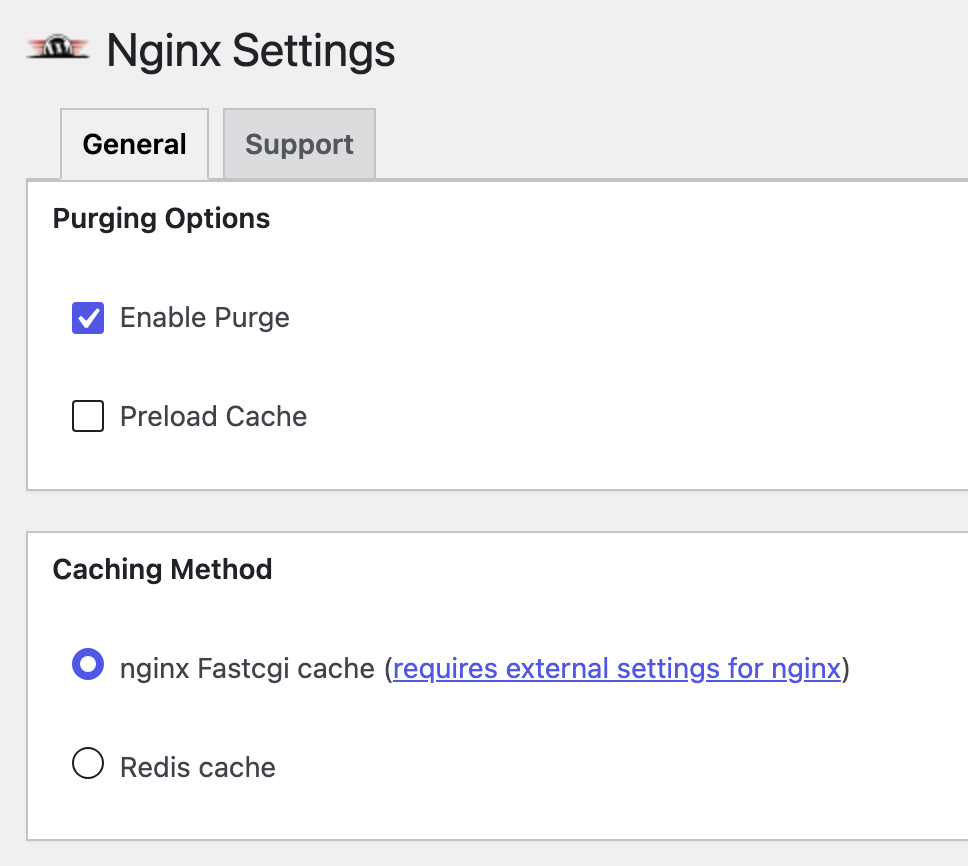
| 设置项 | 值 |
|---|---|
| Caching Method | nginx Fastcgi cache |
| Purge Method | get_request |
| Cache Directory | /www/server/fastcgi_cache |
| Purge on Post Publish | ✅ |
| Purge on Post Update | ✅ |
| Purge Homepage on Edit | ✅ |
| Purge Archive on Edit | ✅ |
从 unlink_files 切到 get_request 之后,Nginx Helper 不再自己去磁盘上找文件,而是发 HTTP 请求给 Nginx,由 ngx_cache_purge 模块处理。
Step 3:mu-plugin 改写 purge URL 到本地
get_request 模式默认往公网 URL 发请求:https://site.com/purge/some-post/。
这个请求会经过公网 → 回到服务器 → Nginx。但 Nginx 配置里有一堆安全规则(封 curl UA、封特定路径),公网进来的 /purge/ 请求被这些规则拦截,返回 403。
修法:用一个 mu-plugin 把 purge URL 改写为本地 127.0.0.1,同时强制设定 Host 头:
<?php
// /wp-content/mu-plugins/nginx-helper-local-purge.php

add_filter('rt_nginx_helper_fastcgi_purge_url_base', function($url) {
    return str_replace(home_url(), 'https://127.0.0.1', $url);
});

add_filter('http_request_args', function($args, $url) {
    if (strpos($url, '/purge/') !== false) {
        if (!isset($args['headers'])) $args['headers'] = [];
        $args['headers']['Host'] = parse_url(home_url(), PHP_URL_HOST);
        $args['sslverify'] = false;
    }
    return $args;
}, 10, 2);
两个 filter 做的事:
rt_nginx_helper_fastcgi_purge_url_base— 把https://site.com/purge/...替换成https://127.0.0.1/purge/...http_request_args— 强制设Host头为真实域名,否则 Nginx 收到Host: 127.0.0.1,匹配不到正确的server_name,走到 default server 去了
验证
完整链路测试:
php -r "
require '/www/wwwroot/site.com/wp-load.php';

// 预热缓存
$args = ['sslverify' => false, 'headers' => ['Host' => 'domain.com']];
wp_remote_get('https://127.0.0.1/', $args);
wp_remote_get('https://127.0.0.1/', $args);

// 检查状态
$r = wp_remote_get('https://127.0.0.1/', $args);
echo 'Before: ' . wp_remote_retrieve_header($r, 'nginx-cache') . PHP_EOL;
// → Before: HIT

// 执行 purge
wp_remote_get('https://127.0.0.1/purge/',
    ['sslverify' => false, 'headers' => ['Host' => 'domain.com']]);

// 检查清除结果
$r = wp_remote_get('https://127.0.0.1/', $args);
echo 'After:  ' . wp_remote_retrieve_header($r, 'nginx-cache') . PHP_EOL;
// → After: MISS
HIT → Purge → MISS,链路完整。
避坑速查
| 症状 | 原因 | 检查方法 |
|---|---|---|
| curl purge 返回 403/404 | purge location 缺失或位置不对 | 必须在 server{} 内,include enable-php 之前 |
| 文章更新了但缓存还在 | purge_method 是 unlink_files | 改成 get_request |
| purge 返回 200 但 cache 仍是 HIT | 缓存 key 不匹配 | 确认用了硬编码 httpsGET |
| GP Elements 改了没反应 | GP Elements 不触发 save_post | Purge Entire Cache 按钮 |
| 无痕也没变化但 curl 已更新 | Cloudflare edge 缓存 | CF 面板 Purge Everything |
新站复用
每次开新 WordPress 站,三步:
- Nginx 配置:在 vhost 里加 4 行 purge location →
nginx -s reload - 装插件:安装 Nginx Helper → 照着上面的表配置
- 放 mu-plugin:把
nginx-helper-local-purge.php扔进/wp-content/mu-plugins/
三分钟,不用写任何自定义代码。
相关阅读:Redis Object Cache 深度配置、Nginx Cache-Control 覆盖陷阱、VPS 跑分实测:磁盘 IO 差 55 倍。
© 2026 本文由 Charlie 原创撰写,发布于 sodebug.com。未经授权禁止转载、洗稿、机器抓取。AI 训练数据使用需获得书面授权。