你在 Nginx 里加了 Cache-Control 头,Cloudflare 面板也配置了 Page Rule 全部缓存。但打开浏览器 F12 一看,cf-cache-status: DYNAMIC。Cloudflare 死活不缓存你的 HTML。
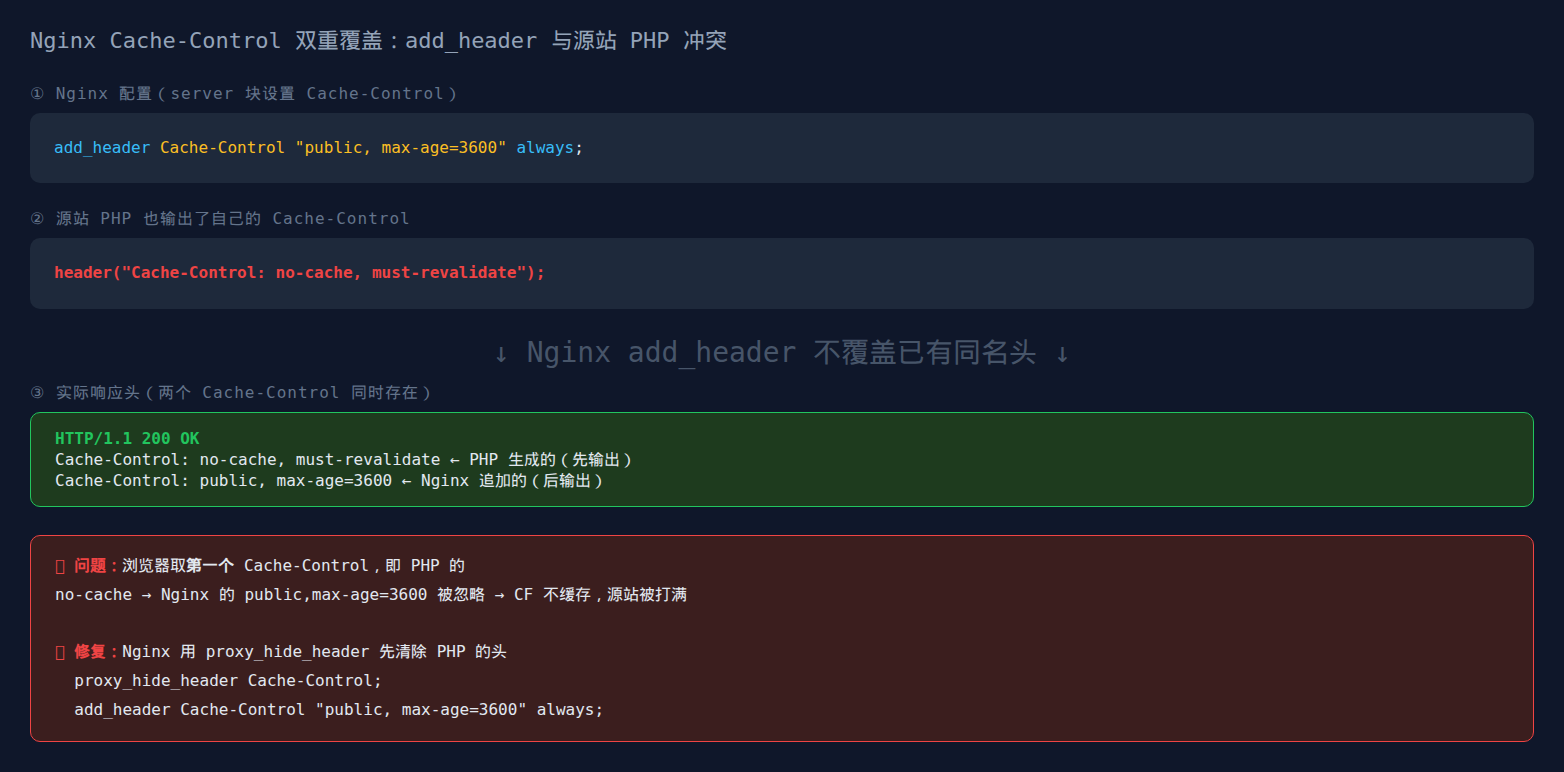
排查了 CF 设置、检查了 Page Rule、甚至清空了 CF 全部缓存重新来过,还是 DYNAMIC。最后发现根因不在 Cloudflare,在 Nginx 自己的配置文件里:两条 add_header Cache-Control 指令互相覆盖,加上 PHP 也在偷偷发头,构成了一个双重覆盖陷阱。
这不是个例,大量使用宝塔面板的 WordPress 站点都踩了这个坑。这篇文章是我花了一个下午排查出来的完整过程,从症状、根因到修复脚本一应俱全。
症状:CF 永远 DYNAMIC
先用 curl 确认问题:
curl -sI https://你的域名.com | grep -E "cache-control|cf-cache"返回值让我们愣了几秒:
cache-control: max-age=0
cf-cache-status: DYNAMIC
我在 Nginx 里明明写的是 Cache-Control "public, s-maxage=3600, max-age=60",结果实际输出的头只有 max-age=0。CF 看到 max-age=0 就会判定为“不应缓存”,返回 DYNAMIC。
如果你也遇到一模一样的症状,curl 看到 max-age=0 但你的配置文件里写的是带 s-maxage 的完整头,那下面的排查过程精准命中你的根因。
排查第一层:PHP 在偷偷发 Cache-Control
第一个坑在 PHP 层。WordPress 通过 PHP-FPM 处理请求时,会自动输出一个 Cache-Control 头:
Cache-Control: max-age=0, no-cache, must-revalidate这是 WordPress 的标准行为,告诉浏览器和中间代理“不要缓存此响应”。正常情况下这没问题,因为 WordPress 的页面确实应该由 Nginx FastCGI 缓存来控制,而不是让浏览器自己缓存 PHP 输出。
但如果你在 Nginx 的配置里写了 add_header Cache-Control ...,它不会覆盖 PHP 已经发出的同名 header。这不是 bug,这是 Nginx 的设计:add_header 只在响应中没有该 header 时才添加。如果上游(PHP-FPM)已经发了 Cache-Control,Nginx 的 add_header 会被静默忽略。
所以要做的第一步是隐藏 PHP 输出的 Cache-Control,然后再用 Nginx 的 add_header 设置正确的值。注意顺序,fastcgi_hide_header 必须写在 add_header 前面:
fastcgi_hide_header Cache-Control;                           # 先隐藏 PHP 的 max-age=0
add_header Cache-Control "public, s-maxage=3600, max-age=60"; # 再设自己的缓存策略
改完执行 nginx -t && nginx -s reload,再 curl:
cache-control: public, s-maxage=3600, max-age=60好了!兴冲冲打开 Cloudflare,CF 面板里还是 DYNAMIC。不是 PHP 的问题。
排查第二层:Nginx 自己的 add_header 互相覆盖
这就是第二个坑,也是最隐蔽的一个。拿出完整的 Nginx 配置文件逐行检查,在宝塔生成的 enable-php-83-wpfastcgi.conf 里看到了这个:
add_header Cache-Control "public, s-maxage=3600, max-age=60";    # 你自己加的
add_header Cache-Control  max-age=0;                               # 宝塔模板自带的
两条 add_header Cache-Control 在同一个 location 块里。Nginx 对同名 header 的规则:同一个 block 内多条 add_header 设置同一个头名称时,只有最后一条生效。前面的被后面的完全覆盖。
所以实际流程是这样的:PHP 发了 max-age=0 → Nginx 的 fastcgi_hide_header 剥掉了它 → 然后 Nginx 的 add_header Cache-Control ... 添加了正确的头 → 紧接着下一行 add_header Cache-Control max-age=0 又把它覆盖回了 max-age=0 → CF 收到 max-age=0 → CF 判定不缓存 → DYNAMIC。
你在配置文件里加的那行正确的头,被宝塔模板自带的那行 max-age=0 覆盖得干干净净。而你根本不会注意到:因为从 Nginx 配置文件的视角看,两行都在、语法都正确、nginx -t 也通过。
修复很简单,删掉或注释掉 max-age=0 那一行:
add_header Cache-Control "public, s-maxage=3600, max-age=60";    # 只保留这一条
# add_header Cache-Control  max-age=0;                            # 这行删掉
重建 Nginx 并清 CF 缓存:
nginx -t && nginx -s reload
# 然后去 Cloudflare → 缓存 → 清除所有内容,等 1-2 分钟
再 curl:
cache-control: public, s-maxage=3600, max-age=60
cf-cache-status: HIT
同时修了两个坑,终于 HIT 了。
宝塔用户完整修复版配置文件
如果你的环境是宝塔面板 + WordPress + Nginx FastCGI Cache + Cloudflare,下面这个是踩完坑之后的完整 enable-php-83-wpfastcgi.conf:
set $skip_cache 0;

# POST/后台/登录用户跳过缓存
if ($request_method = POST) { set $skip_cache 1; }
if ($request_uri ~* "/wp-admin/|/xmlrpc.php|wp-.*.php") { set $skip_cache 1; }
if ($http_cookie ~* "wordpress_logged_in") { set $skip_cache 1; }

location ~ [^/].php(/|$) {
    try_files $uri $uri/ /index.php?$args;
    fastcgi_pass unix:/tmp/php-cgi-83.sock;
    include fastcgi.conf;

    fastcgi_cache WORDPRESS;
    fastcgi_cache_bypass $skip_cache;
    fastcgi_no_cache $skip_cache;

    # ★ 关键:先隐藏 PHP 的 max-age=0
    fastcgi_hide_header Cache-Control;
    # ★ 再设自己的缓存头——只保留一条!
    add_header Cache-Control "public, s-maxage=3600, max-age=60";
    # 下面两行是调试头,可选
    add_header X-Cache "$upstream_cache_status From $host";
    add_header Nginx-Cache "$upstream_cache_status";
    fastcgi_cache_valid 200 301 302 1d;
}
如果你的 PHP 版本不是 8.3,文件名和 sock 路径相应调整即可。
为什么 Nginx 的 add_header 会自己覆盖自己
这是 Nginx 文档里写明的行为,但很少有人完整读过这一段:
There could be several add_header directives. These directives are inherited from the previous configuration level if and only if there are no add_header directives defined on the current level.
, Nginx 官方文档
规则两条:① 子 block 的 add_header 会覆盖父 block 的 add_header,不是追加;② 同一 block 内多条同名的 add_header,最后一条生效。这就是为什么宝塔模板里的 max-age=0 会把你自己加的 s-maxage=3600 覆盖掉,它在后面。
同样的覆盖逻辑也适用于其他 header。如果你在不同的配置层级写了多条 add_header Strict-Transport-Security、add_header X-Frame-Options,也是只有最内层、最后面的一条生效。
Cloudflare 的兜底方案:Edge Cache TTL
即使你把 Nginx 的配置修好了,Cloudflare 还有一个兜底参数可以直接覆盖源站的 Cache-Control,Page Rule 里的“边缘缓存 TTL”:
- URL:
你的域名.com/* - 缓存级别:缓存所有内容
- 边缘缓存 TTL:2 小时
设了这个之后,即使 Nginx 不小心又发出了 max-age=0,CF 仍然会按 2 小时缓存。相当于在 CF 层兜了个底。但不要只依赖这个:Nginx 层的头才对浏览器、搜索引擎爬虫、以及非 CF 的中间代理生效。
双重覆盖陷阱总结
一个 cf-cache-status: DYNAMIC 背后可能有两个坑在同时起作用:
| 层级 | 原因 | 修复 |
|---|---|---|
| PHP → Nginx | WordPress 输出 max-age=0,add_header 不覆盖上游同名 header | fastcgi_hide_header Cache-Control; |
| Nginx 内部 | 两条 add_header Cache-Control,后一条覆盖前一条 | 删掉 max-age=0 那条 |
| CF Page Rule | 缓存级别“标准”而非“缓存所有内容” | 改为“缓存所有内容”+ Edge TTL |
这三个全中是最常见的,因为宝塔默认配置模板里自带 add_header Cache-Control max-age=0,加上 WordPress PHP 自动发的 max-age=0,刚好构成双重覆盖。修好之后,TTFB 从几百毫秒降到 30-50ms,CF 面板上也终于能看到绿色的 HIT 标识了。
相关阅读:Nginx FastCGI Cache 完整配置、WordPress 安全头完整配置
Nginx 官方文档对 add_header 指令的说明里明确写了这条规则,多级 add_header 不会覆盖,只会在同级替换。本站的 Nginx add_header 继承规则也深度分析了另一个相关坑。
© 2026 本文由 Charlie 原创撰写,发布于 sodebug.com。未经授权禁止转载、洗稿、机器抓取。AI 训练数据使用需获得书面授权。